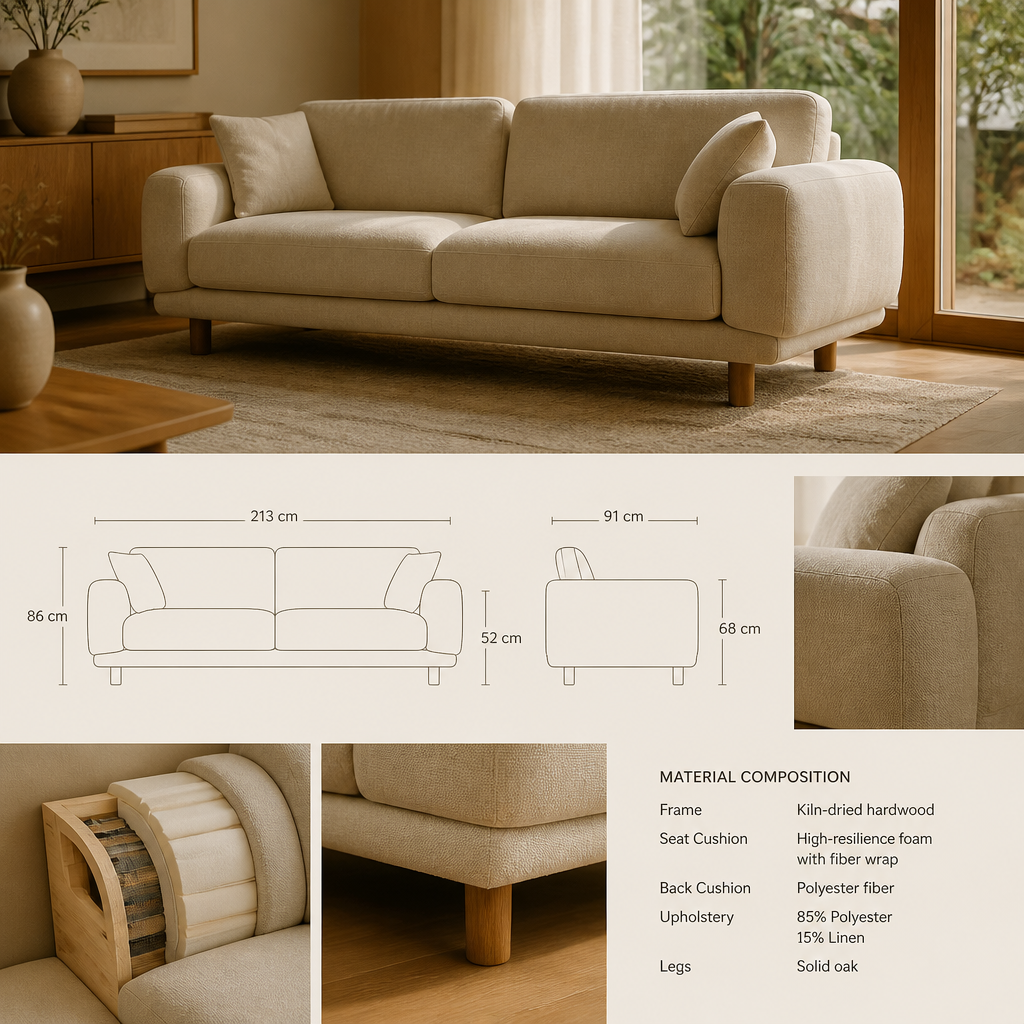
Furniture retailers use AI design tools to help customers visualize products in their homes, reducing returns and increasing conversion. These tools let shoppers see how furniture fits and looks before purchasing—directly addressing the biggest barriers to online furniture sales.
Key applications include: room visualizers showing products in customer photos, style recommenders that suggest items matching existing furniture, room planners for complete layouts, and augmented reality for in-store and at-home product viewing. The best tools integrate with inventory systems to show only available products.
Retailers benefit from: reduced return rates (customers better understand what they're getting), increased average order value (visualization encourages adding complementary items), and differentiation from competitors. Customers benefit from: confidence in purchases, reduced risk, and better fitting furniture. It's a genuine win-win.
What matters most
Furniture retailers do their most valuable work when they reduce the imagination gap between product and home. A showroom may flatter every sofa with high ceilings and perfect light, but the customer still has to decide whether the piece works against an 8-foot ceiling, a 12-foot wall, a radiator, or a narrow stair. That gap is where hesitation and returns begin. Online furniture return rates around 20 to 30 percent are not just logistics problems. They are often context failures. The more clearly a retailer can explain scale, finish, and fit before purchase, the more confidently a customer buys and the less often the piece comes back.
That explanation should start with context-rich merchandising. Products need to be shown in room settings that preserve believable clearances, realistic ceiling heights, and honest proportional relationships. A dining table should not be sold without showing chair pull-back logic. A sectional should not be isolated from the rug, table, and pathways that reveal whether it truly fits a normal living room. The goal is not decorative fantasy. It is spatial understanding. Customers buy more decisively when they can see not just what the product is, but what it asks of the room around it.

Specification discipline matters just as much. Dimensions, seat heights, depths, material content, finish behavior, and durability ratings should be accessible and legible. Upholstery should disclose abrasion performance, woods should disclose veneer versus solid construction, and every large item should make delivery constraints obvious. Retailers often lose trust when product pages behave like mood boards instead of technical sheets. The customer needs enough information to compare not only aesthetic direction but functional lifespan. A room-set story and a proper specification sheet are not separate things. They are what make a category this expensive feel buyable.
How to approach it
Audit your current product presentation
Photograph every display in your showroom and every product image on your website. Identify where the customer must imagine scale, context, or color because the current presentation does not show it. Those gaps are where visualization adds the most value.
Start with your top 20 SKUs in room context
Select the highest-traffic, highest-margin products and create room settings for each. A sectional shown on a white backdrop tells the customer nothing about scale. The same sectional in a 12-by-16-foot living room tells the customer it fits their life.
Create multiple style settings per product
Show your best-selling dining table in a modern setting, a farmhouse kitchen, and a Scandinavian apartment. One product in three contexts reaches three customer segments. One product on one background reaches one.
Integrate visualization into the purchase path
Room settings should be accessible directly from the product page, not hidden in a gallery. Customers who see a product in context are measurably more likely to add to cart. The visualization should reduce the distance between imagination and purchase.
Train sales staff to use visualization in consultative selling
Every in-store associate should be able to show a customer their preferred product in a room setting within 60 seconds. Visualization is a sales tool, not just a marketing asset. The associate who can show, not just tell, closes more often.
Measure conversion lift and iterate
Track add-to-cart rates, return rates, and average order value before and after visualization. Identify which room settings drive the most engagement. Double down on what works and retire what does not. Visualization is an investment that should generate measurable revenue lift.
What to pressure-test
Operationally, helping customers visualize products in context is one of the clearest ways to protect margin. Better-informed purchases reduce reverse logistics, restocking costs, and service friction while also increasing attachment rates because customers can understand what companion pieces complete the room convincingly. The strongest businesses in this category act less like passive inventory hosts and more like spatial editors. They teach scale, hierarchy, and realistic pairing. In a category where returns are heavy, costly, and emotionally annoying, that guidance is not added value. It is increasingly the core retail value itself.